
You can find competitors' Instagram and Facebook ads in the Meta Ad Library, and ads on Google properties such as Search and YouTube in the Google Ads Transparency Center. Search by advertiser name, then align the country and date range to compare the copy, images, and videos they have used.
It is easy to open an ad library expecting it to reveal what sold well, too. I start by narrowing the purpose of the research. Decide whether you want an opening line for your next ad, a way to explain a product benefit, or a comparison of landing-page layouts. Choosing one objective first helps avoid spending a long time browsing ads and ending up with nothing but saved images.
1. Prepare the brand name and advertiser name separately
Choose two or three competitors and note each brand's Korean name, English name, official website, and official social accounts. The name customers recognize may differ from the company name shown on an ad. Distinguish the official Korean account from the global account as well.
Google's current ads transparency policy describes the disclosure of information about unverified advertisers as well as verified ones. Depending on verification status and other factors, the displayed name may be a legal name, trade name, or the name on a payments profile. Avoid relying on outdated guidance that says only verified advertisers can be searched. Google's advertiser information disclosure criteria
A matching search result does not automatically mean you have found the same company. Check that the linked site and official account are correct. Mixing in ads from a business with the same name or a reseller will distort the comparison that follows.
2. Find current ads in the Meta Ad Library
The Meta Ad Library is a public tool for finding ads currently running on Meta properties. When researching ordinary commercial ads in South Korea, use the following sequence to define the search.
- Select South Korea as the country where the ads run. Use the market you are researching, not the location of the company's headquarters.
- For general brand research, select “All ads” as the ad category.
- Search for the brand or advertiser name and select the matching Page.
- If there are many results, narrow them using the platform, media-type, or other filters available on screen. It is often easier to find the right ads by viewing all results first rather than starting with very restrictive filters.
- Open an individual ad's details and record what is actually displayed, such as its copy, creative, and start date.
A complete historical record of ordinary commercial ads is not always available. In addition to current ads, Meta describes separate disclosure scopes, including seven years of ads about social issues, elections, or politics and the past year of ads shown in the UK or EU. Do not assume information visible for another country is also available for Korean ads. Meta Ad Library search coverage
If one creative appears to be used in several ads, first check whether the copy and video actually differ. There is no need to translate the number of ad cards directly into a campaign count or a number of experiments. The unit you can verify is the ad publicly shown on the screen.
3. On Google, try the domain after the brand name
The Google Ads Transparency Center lets you find ads on Google properties including Search, Display, Gmail, and YouTube. You can search by advertiser or website name and adjust the dates and target region. If the brand name yields nothing, try the official site's domain. Google ads transparency guidance
After selecting an advertiser, first check whether the ads target South Korea and which period the results cover. Choose text, image, or video formats to suit the research question. Seeing the formats of recently served ads and information such as their last shown date is a basic purpose of this tool. Google's introduction to the tool
For example, a brand might lead with the product name and price in a search ad but show the product in use at the start of a video. This is an illustration of how to compare ads. If you observe it, write “the opening explanation differs by channel,” not “video performs better than search.” Public creative alone cannot establish how the two channels' conversion rates compare.
To examine the landing page as well, check whether the destination is available in the ad details. If no link is shown or it cannot be opened, record separately that you visited the official website yourself. Do not assume that a product page you found independently is the ad's actual landing page.
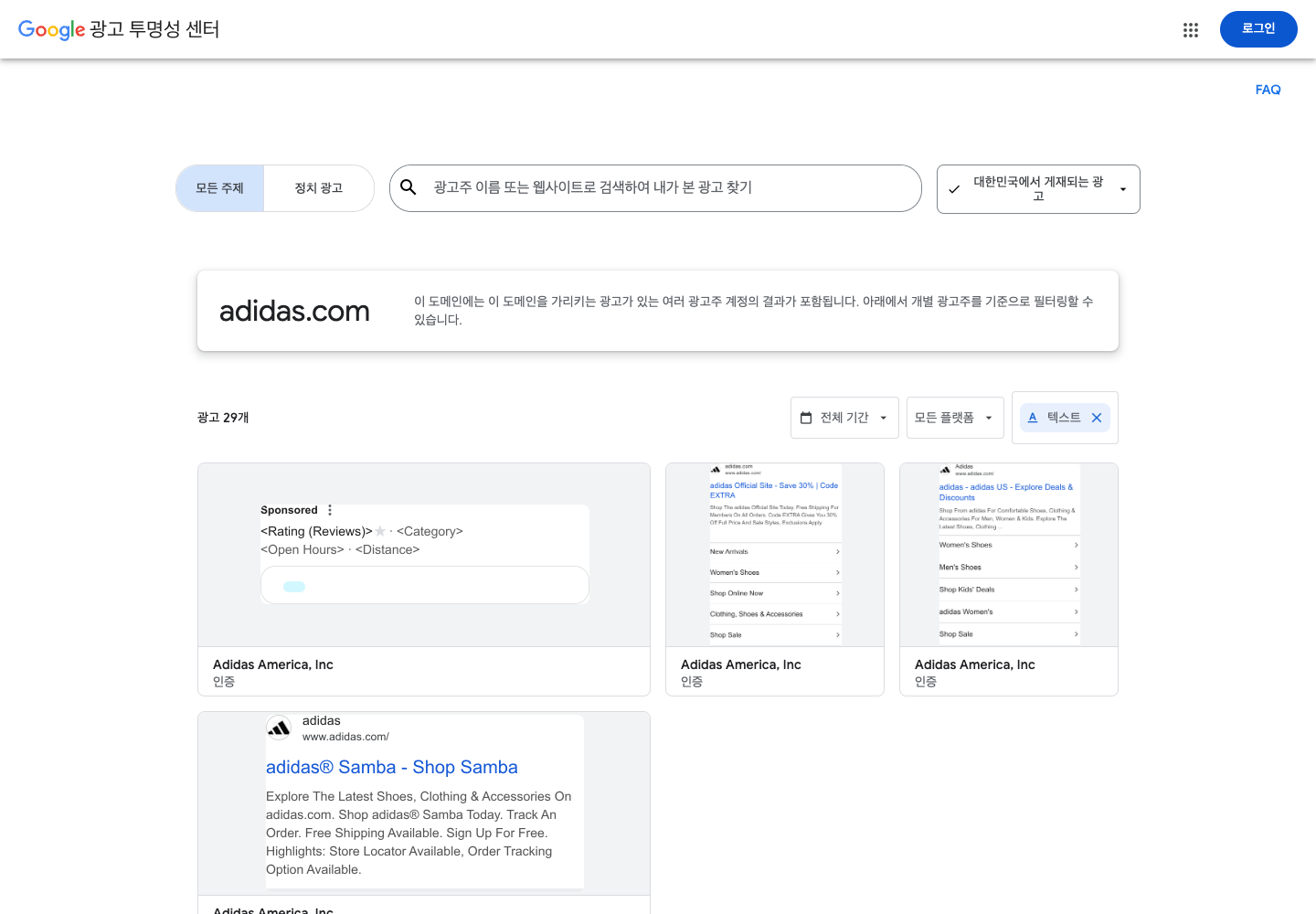
4. Follow a checking sequence when you cannot find an ad
No results initially means you did not find an ad under the selected conditions. Do not immediately conclude that the company does not advertise.
- Try different names. Check the Korean and English brand names, legal company name, and official Page name in turn.
- Relax the filters. Check whether the country, date range, ad type, or platform restrictions are too narrow.
- Check the operating account. A local retailer or a separate brand Page may be the advertiser.
- Recheck the channel. Do not assume that every regular Instagram post or sponsored piece of content appears in the Ad Library.
- Separate coverage from ad status. Check whether the ad has ended and whether it falls within the retention scope for that region.
If you still cannot find it, record “not found” together with the search terms, filters, and date checked. You do not need to force an answer into an empty cell. A record that lets someone repeat the same search later is more useful.
5. Record the order of persuasion, not just the wording
For an initial review, choosing about three ads per brand is enough. The table below is a practice example for reading a fictional household-product ad, not an analysis of a particular company's actual advertising.
| What to compare | Example observation | Question for your own ad |
|---|---|---|
| Opening scene or line | The product is placed beside a small sink | Does the customer's setting appear first? |
| Problem being addressed | Water pools after washing dishes | Should the inconvenience be explained before the product name? |
| Evidence | A close-up of the drainage design | Are benefits merely claimed, or is there visible evidence? |
| Purchase conditions | Dimensions, price, and shipping conditions are explained | Is information the customer needs before buying missing? |
| Next action | The viewer is invited to check detailed specifications | Can the information promised in the ad be found on the destination page? |
Recording an ad this way produces tasks for filming and copy revision rather than an impression such as “a clean-looking video.” If a competitor shows size relative to a hand while your ad contains only a product photo, for example, you could add a scene that helps people understand your product's size. This approach studies how information is communicated rather than copying a particular sentence or shot.
Do not stop after the first few seconds of a video. Check how it explains the opening promise later, and whether important conditions appear only in small text at the end. This makes omissions in your own ad easier to spot. If you have checked both the ad and its destination, also record whether the same product and offer are easy to find on the landing page's first screen.
6. A long-running ad is not necessarily a successful ad
An ad that remains visible for a long time is a candidate for closer examination. Its start date does not reveal its profitability, however. Spend might be low, the objective might be brand awareness, or operational circumstances not visible in the library might be involved. Public creative does not establish which explanation applies.
Likewise, many ads do not prove a large budget, and frequent copy changes do not prove poor results. Do not report that routine commercial-ad research has revealed a competitor's purchase conversion rate, revenue, or ROAS. Some regions or ad types disclose certain impression or spending information, but that still does not provide a complete picture of profitability.
Separate “what I observed” from “a hypothesis I could test” in the research sheet. “The ad shows a close-up of the drainage design” is an observation. “Showing the design may improve our customers' understanding” is a hypothesis. The hypothesis becomes something to test in your own advertising.
7. Turn the research into one new creative
For examples from another channel, you can also consult TikTok's Top Ads. Its scope differs from a competitor's complete advertising history: it is a collection of high-performing creatives that advertisers have authorized for public display. The existing Top Ads screen currently carries a notice about the move to TikTok One and the end of updates to existing features, so follow the latest instructions on the entry page. What TikTok Top Ads includes, Official Top Ads screen
Rather than build a large reference library immediately, choose one element from the ads you reviewed that could improve your own product explanation. Turn it into a clear next task: “show the size in the opening scene,” “demonstrate how it works midway through the video,” or “put the shipping conditions on the landing page's first screen.”
Save the ad-detail URL or identifier, date checked, country, and observations so the original can be revisited. In the final column, write “the one thing to change in this creative.” The output of public-ad research is not a competitor's report card. It is a specific idea to test so you can explain your product more clearly to your customers.